Three scopes — please confirm what's in and what's out
Yoongmei runs a 40-year freight and transport operation — across both your FTL (full-truck-load) and LTL/groupage (loose-carton) divisions — on a capable in-house Planning System, but takes customer orders by hand: enquiries arrive by WhatsApp and a public web form, staff read and re-key each one into the Planning System, then re-key a second time into a separate ordering backend. The cost of manual intake is not just time — orders get missed, and a missed order is lost revenue and a customer who tries a competitor next.
Prisma proposes a three-part engagement, each part independently scoped and approved:
| Scope | What you get | |
|---|---|---|
| 0 | Systems Takeover & Security | Your IT estate inventoried, secured, and documented in your name — essentials only |
| A | AI WhatsApp Customer Service Assistant | The assistant you've seen, fully managed in production — WhatsApp + website chat, 3 languages, answering customers 24/7 |
| B | Customer Ordering System | Login-free customer ordering that flows straight into your Planning System — no re-keying, no missed orders |
Every order is typed twice, by hand
Two divisions, one intake problem
One customer books the entire truck for their shipment. Fewer, larger jobs — pickup, drop-off, truck type and date drive the order.
Loose cartons from multiple customers consolidated into one truck. Many more bookings per truck, and more fields per booking — carton count, dimensions, weight — so far more re-keying.
Both divisions funnel through the same manual, free-text intake today. An order travels like this:
We looked at the live system. The public enquiry form drops every request into a single free-text box — pickup, drop-off, container size, cargo type, weight and date all mixed into one paragraph that a person must untangle for every order. Genuine freight enquiries sit buried among marketing spam, triaged by hand with a "replied" checkbox. It works because your people are diligent — but it does not scale, and it leaks orders.
Systems Takeover & Security
You are taking ownership of your full IT estate from your previous developer — servers, cloud account, domains, and all the passwords. Before anything new is built, Prisma secures and documents what you already own. This scope is deliberately kept lean and essentials-first: it covers exactly what must be fixed before any build starts, nothing more.
We reviewed the handover package. In its current state, the access it contains is not safe to leave as-is — credentials are weak, reused, and were shared insecurely. Tightening this is the foundation everything else stands on.
What the handover contains
For transparency, this is the access that was passed over. Identifiers are masked here because this page is shared, and no passwords appear anywhere in this document:
| Category | What was received (masked) |
|---|---|
| Planning System admin | Admin panel for your Planning System — administrator login + password |
| Servers ×5 | AWS EC2 (Singapore) — production 3.1.x.x, staging/email 18.138.x.x, production-system 13.213.x.x, staging-system 18.141.x.x, AutoCount Windows server 18.141.x.x (remote desktop) |
| SSH access | One shared private key (issued 2016) used for all 4 Linux servers |
| AWS root account | del•••••@gmail.com — the cloud account that controls all servers |
| Gmail master | Same del•••••@gmail.com mailbox; its two-factor seed was transmitted as an image file |
| Domains ×15 | 2 GoDaddy accounts (yoongmei•••, max•••) — yoongmei.com / .net / .sg, delsnap.com / .sg, 3000trucks.com + 9 more |
| Database portal | A public database admin portal — root database access, reachable from the public internet |
Personal profile + Business Manager (max•••@delsnap.com) — shared password | |
| Apple Developer | Same account and password — holds your App Store signing keys |
| Other accounts | 1 additional third-party account — to be confirmed with you during the inventory |
What we'd fix on day one
Two items don't wait for the full sweep — they're exposed right now, so we'd close them first:
- Your database is reachable from the public internet. The database admin portal currently accepts connections from anyone, not only your own servers — we lock it down to your systems alone.
- Your cloud-account recovery isn't fully in your control. The account that owns every server can today be recovered through access that isn't solely yours — we rebuild it so only you hold the keys.
Itemized deliverables
| # | Item | What's included |
|---|---|---|
| 0.1 | Full estate inventory | 5 servers, cloud (AWS) account, 15 domains, social & developer accounts — one register of everything you own |
| 0.2 | Credential security sweep | Rotate every password, enable two-factor authentication everywhere, rebuild cloud-account recovery so only you control it |
| 0.3 | Access lockdown | Close publicly-exposed database access, least-privilege per system, re-issue server keys (retire the shared decade-old key) |
| 0.4 | Password manager handover | All credentials secured in a proper password manager, handed to you with training |
| 0.5 | Documentation | Architecture + security baseline document, domain renewal/billing confirmation, plain-language handover doc — what you own, what's protected, what it costs to run |
AI WhatsApp Customer Service Assistant
A fully managed AI assistant on a dedicated WhatsApp number (1 free number included; up to 10 supported for branches/departments), answering customers 24/7 in 3 primary languages (English, Bahasa Malaysia, 中文 — Tamil/Vietnamese understood too). This is not a generic chatbot template: it is a production-grade AI engine already serving live businesses, customised to Yoongmei's services, rates, and coverage areas.
Setup — itemized inclusions
| # | Included in setup | Detail |
|---|---|---|
| A.1 | WhatsApp provisioning | 1 free dedicated number + account setup, profile, connection (up to 9 more numbers at no extra setup cost) |
| A.2 | AI platform configuration & deployment | 4-tier intent classification (pattern → fuzzy → semantic → LLM), automatic language detection, prompt-injection protection, multi-provider AI failover |
| A.3 | Knowledge base compilation | We structure ALL your static info — services (FTL whole-lorry charter, LTL/groupage consolidation, LCL/FCL, cross-border), coverage & ports (Pasir Gudang, Tanjung Pelepas), rates guidance, FAQs, hours. You give raw materials; we do the rest |
| A.4 | Guided quotation collection | Structured 8-step workflow — name, pickup, delivery, commodity, quantity, weight, dimensions, billing — complete enquiry summary sent to your team. No detail missed |
| A.5 | Admin dashboard + team-leader oversight | Live conversation monitor, staff-reply review with identity/timestamp, auto/manual mode control per conversation, searchable history, escalation queue with urgency detection |
| A.6 | Web channels (bonus) | Embeddable website chat widget + standalone webchat page — included at no extra cost |
| A.7 | Testing, QA, go-live & training | Plus full data export (CSV/JSON) on request after 6 months — already included, no exit fee |
What it handles — and when it brings in your team
- Service & coverage questions — which routes, ports and truck types you serve; FTL vs LTL; cross-border to Singapore.
- Quotation requests — runs the guided 8-step collection and hands your team a complete, structured enquiry.
- Shipment-status enquiries — once Scope B is live, a customer can ask "where's my order?" and get a real answer.
- Company basics — operating hours, contact, billing details, common FAQs.
- Brings in your team for — price negotiation, complaints, and anything it isn't confident about: it escalates with the full conversation attached, and never guesses.
What a customer conversation looks like
1️⃣ Nama / syarikat anda?
2️⃣ Alamat pengambilan di Puchong?
3️⃣ Berat & ukuran kotak (anggaran)?21:47
Ongoing managed service
A monthly subscription covers everything needed to keep the assistant running and improving: a generous AI usage allowance (~5,000–10,000 conversations/month), managed hosting with 99.9% uptime, daily backups, knowledge-base updates whenever your information changes, proactive monitoring + priority support, and every upcoming feature included — voice in/out, OCR of delivery orders, Google Calendar & Gmail integration, scheduled messages, broadcast campaigns, weekly WhatsApp performance reports, customer contact database. The subscription begins only when the assistant is live with real customers.
Phased rollout (risk-free)
- Phase 1 — Assisted: AI suggests, your team approves every reply. Zero risk of wrong answers reaching customers.
- Phase 2 — Semi-autonomous: routine FAQs answered automatically; quotations, pricing and complaints still routed to staff.
- Phase 3 — Full autonomous: AI handles the volume, your team handles the exceptions.
Why it beats hiring
| Traditional staff | AI assistant | |
|---|---|---|
| Working hours | 8 hrs/day, 5–6 days | 24/365 |
| Languages | 1–2 | 3, instantly |
| Simultaneous customers | 1–2 | Unlimited |
| MC / leave / training time | Yes | Never |
| Consistency | Varies by mood/fatigue | Always consistent |
Customer Ordering System
The core of the engagement: a login-free ordering experience for your customers that writes structured orders straight into your Planning System — eliminating both manual re-keys and the missed-order problem.
What your customers get
Place an order via WhatsApp or a one-tap link — no account, no password. Pickup, drop-off, container type, cargo and date captured as structured fields, not a free-text blob. Automatic status updates (received → dispatched → delivered).
Two ways to order — one system behind it
Your customers don't all work the same way, so ordering meets them where they are. Both channels capture the same structured fields, run the same validation, and land in the same staff review queue — you maintain one system, not two.
Customers who live in WhatsApp simply message you. The bot collects each field in conversation, confirms the summary, and submits — no app to install, no form to hunt for.
Customers who prefer a form tap a shareable link (also embeddable on your website and Facebook page). Same fields, same validation, still no login.
Pickup: Puchong · Drop-off: Singapore.
What's the total weight and carton size?09:02
LTL · Puchong → Singapore · 12 cartons · 180 kg · 18 Jun
Reply YES to submit — I'll send status updates right here.09:03
What your staff get
Orders arrive already structured and validated in the Planning System. Your intake team moves from copy-typing to a quick review-and-approve screen. No second re-keying.
Built for what's next
Architected multi-tenant from day one, so the same platform can onboard a second fleet operator when you're ready to grow toward the 3000trucks vision — without a rebuild.
How an order will travel after Scope B
The order form, done right
Instead of one free-text box, every order starts with a service-type selector — FTL (whole lorry) or LTL/groupage (loose cartons) — and the form adapts: FTL asks for truck type and full-load details; LTL asks for carton count, dimensions, weight and consolidation handling. Every order captures structured fields: pickup point, drop-off point, container/truck type, cargo type, weight, and required date. The system validates each field as the customer fills it — an order cannot arrive incomplete. Repeat customers are recognised by phone number, so their company details pre-fill without any account or password.
What your staff see
A review console lists every incoming order with its structured fields already in the Planning System. Staff approve clean orders in one click, edit the rare exception, and flag spam — instead of untangling paragraphs and typing each order twice. Nothing is dispatched without staff approval: automation does the typing, your people keep the judgment.
Itemized modules (Phase B2 build)
| # | Module | What it does |
|---|---|---|
| B2.1 | Customer ordering interface | Login-free ordering via WhatsApp bot and one-tap web link; service-type selector (FTL / LTL-groupage) with mode-specific structured fields; repeat-customer recognition by phone number |
| B2.2 | Planning System integration layer | The API endpoints your system doesn't expose today — order creation, customer lookup, status read/write — designed, built, and documented |
| B2.3 | Order validation engine | Field-level validation per service type (FTL: truck type, full-load details; LTL: carton count, dimensions, weight) plus locations and dates; incomplete or spam enquiries filtered before they reach staff |
| B2.4 | Intake hand-off automation | The double-entry between your two systems replaced by a single automated flow into the ordering backend |
| B2.5 | Staff review & override console | One screen to review, approve, edit, or reject incoming orders; full audit trail of who approved what |
| B2.6 | Customer status notifications | Automatic WhatsApp updates at each stage: received → dispatched → delivered |
Phased delivery
| Phase | Weeks | Deliverable |
|---|---|---|
| B1 — Discovery & Design | 2 | UX prototype + integration spec + field dictionary, signed off with you; final channel form (WA bot vs link vs both) decided here |
| B2 — Build | 6–10 | The 6 modules above, working and internally tested |
| B3 — Deploy & Handover | 2 | Live in production; staff trained; documentation; 90-day warranty begins |
Will it really connect to the system you already run?
It's the first question any owner should ask — because without a real connection to your Planning System, an ordering layer is just another inbox to re-key. Our answer isn't a promise; it's based on a hands-on, read-only walk through your live system on 12 June 2026. We looked before we quoted.
The whole idea, in one picture
What we found inside your Planning System
It isn't a thin order tool — it's a full Transport Management System ("YMTT ADMIN") that already runs your freight back-office end to end:
- Enquiries → Delivery Orders → Logsheets → Invoices — the whole job lifecycle is already modelled in your system.
- Customers records, plus a Customers ⇄ AutoCount sync that already mirrors customers into your accounting.
- Drivers, Outsource Drivers and YM Lorries — your own fleet and subcontracted capacity, already tracked.
- A separate TESTING environment running alongside the live system.
Why that's good news for the integration
| What we found | What it means for the build |
|---|---|
| Your enquiry intake already exists and is public-facing | Scope B writes structured orders onto rails that are already there — we're not inventing your intake from zero. |
| An AutoCount customer sync already exists | We reuse your existing accounting bridge instead of building one. Less to build, and less that can go wrong on the finance side. |
| A separate TESTING environment exists | We build and prove the entire integration on a copy of your system. Production is switched on only after you sign off — your live operation is never the guinea pig. |
| Multi-fleet records are already present | The platform can grow toward your 3000trucks vision without a rebuild. |
The one piece that's genuinely new — and why it's everything
Your system doesn't yet expose a connection point ("API") for outside software to talk to it. So the core engineering task — and the single most important part of the whole engagement — is to build a small, documented set of connections directly into your existing system. Without these, the ordering layer cannot perform; with them, an order flows end-to-end with no re-keying. There are exactly four, and we already know what each must do:
| Connection | What it does |
|---|---|
| 1 · Create order | A new customer order is written straight into your Planning System as a proper job record. |
| 2 · Look up customer | A returning customer is matched to their existing record, so their details pre-fill — no duplicate accounts. |
| 3 · Read & update status | The order's progress (received → dispatched → delivered) is read back from your system. |
| 4 · Status notification | When the status changes in your system, the customer is updated automatically on WhatsApp. |
These are defined, scoped tasks — designed and signed off with you in Phase B1 — not mysteries we discover mid-build. We mapped them first, not last, precisely because everything else depends on them.
Inside your Planning System — a visual tour
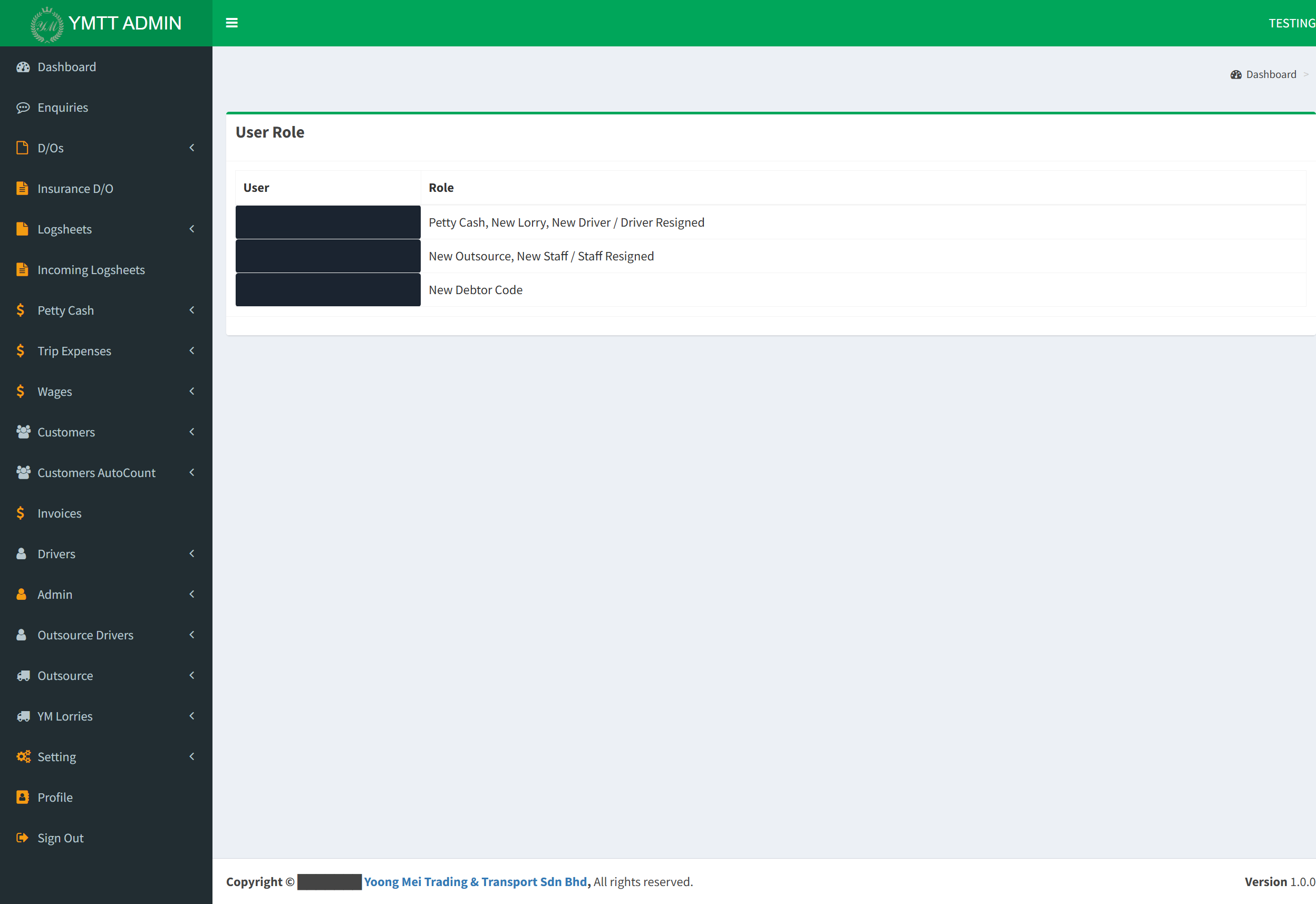
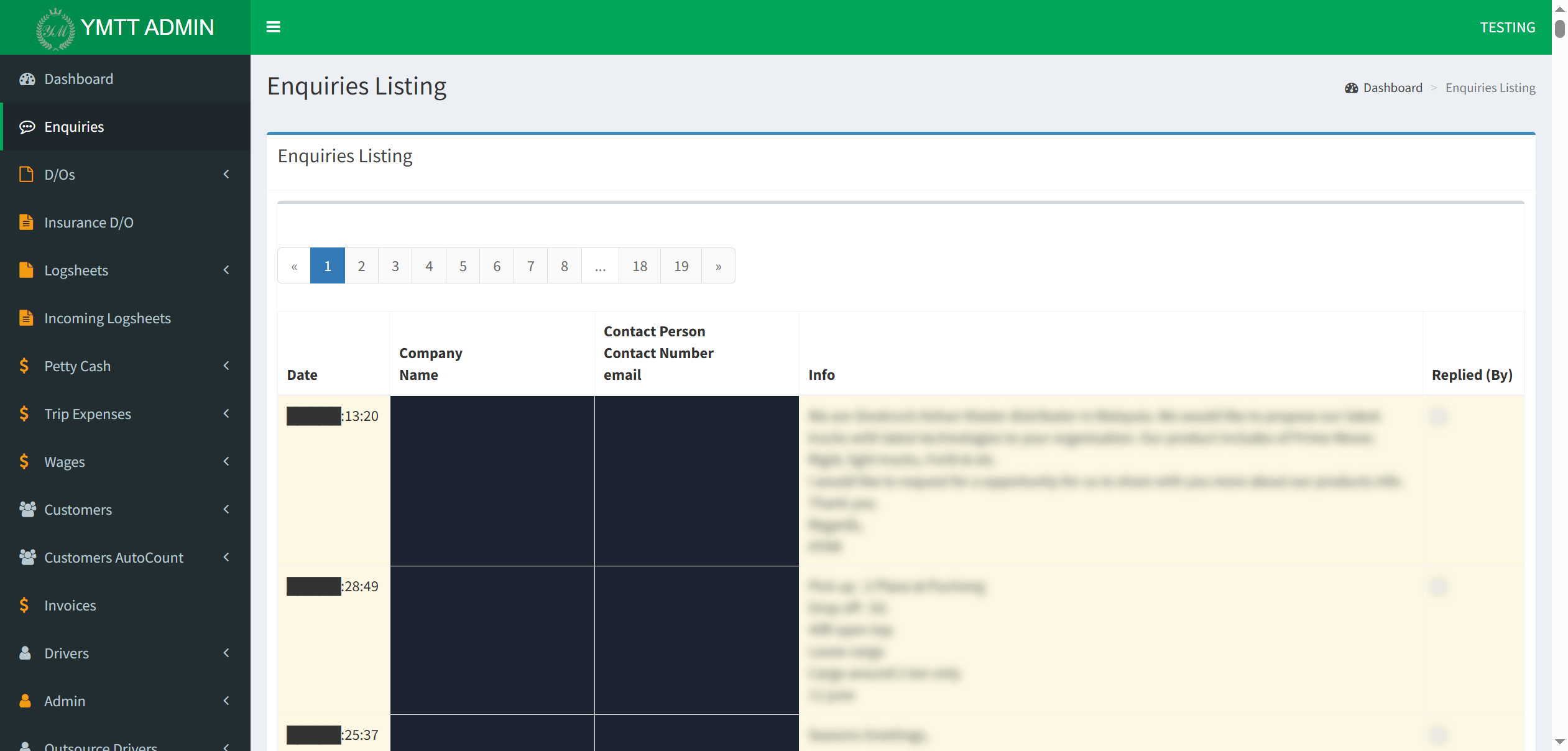
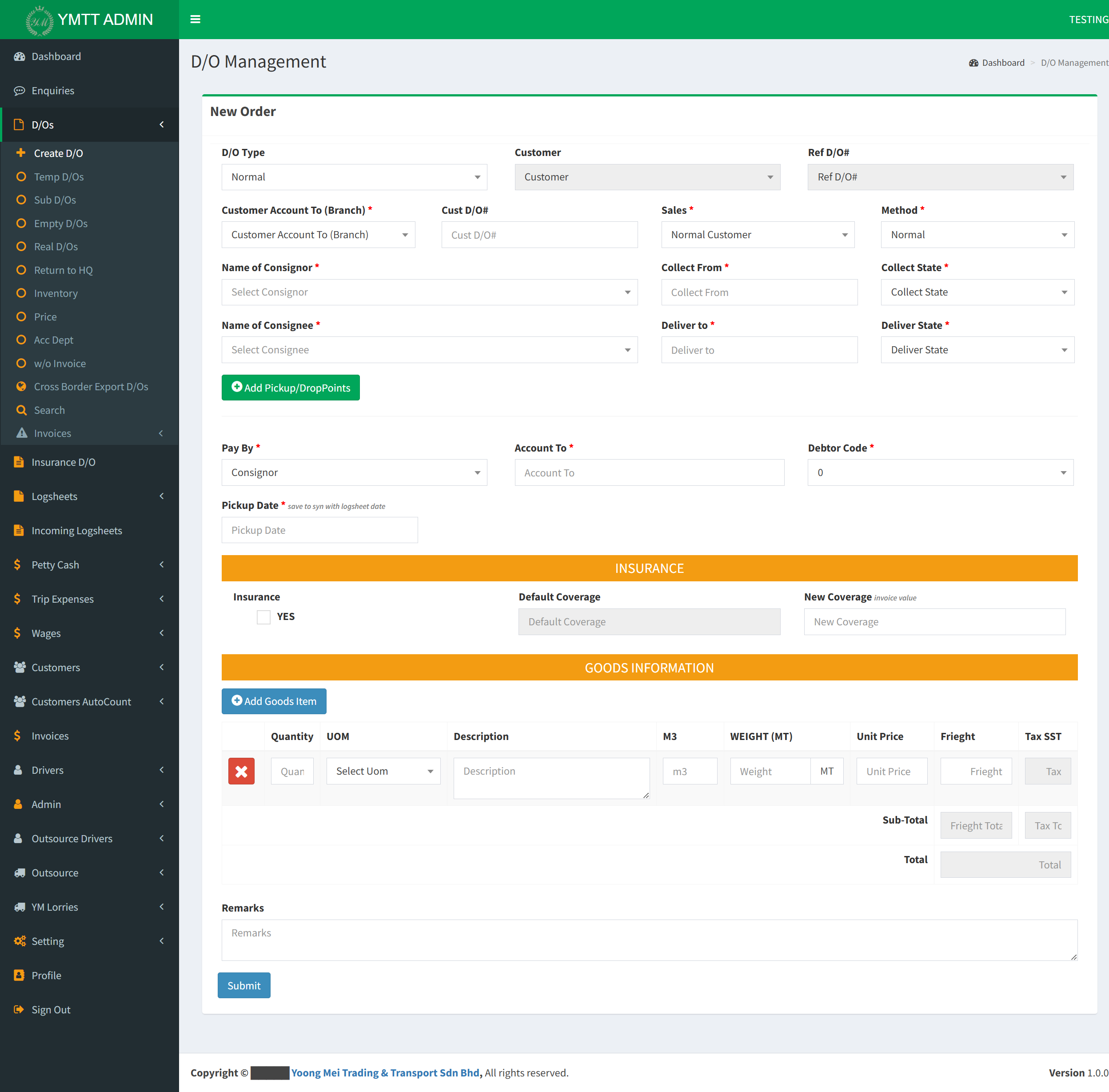
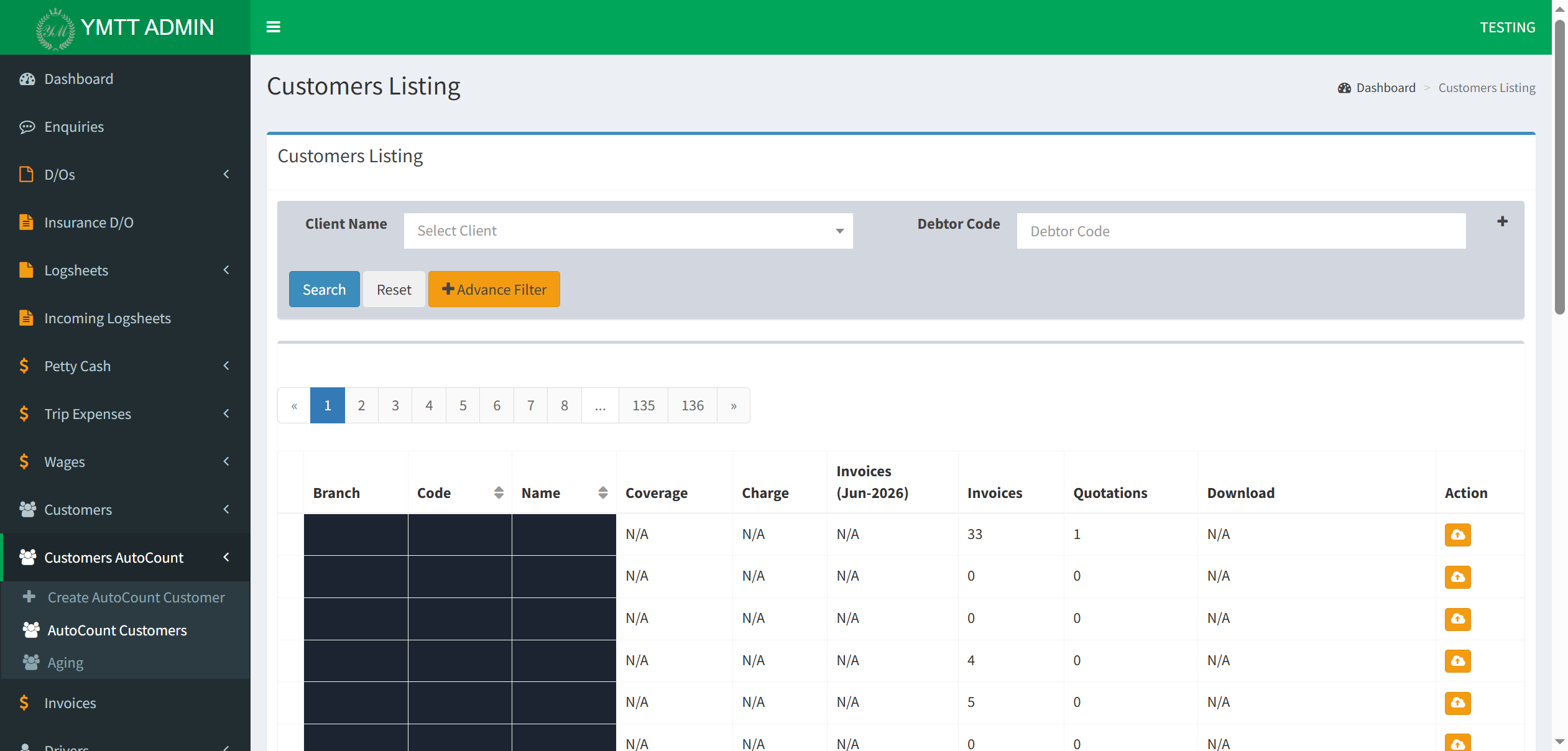
These are real screens from your live YMTT Admin (its TESTING environment), captured during our walk-through. Customer names, phone numbers and emails are blacked out for privacy. They show what your system already does, where its boundary sits, and exactly where the new ordering layer plugs in — a reference for whoever builds it.
The left-hand menu is the entire freight back-office: Enquiries, Delivery Orders, Insurance D/O, Logsheets, Petty Cash, Trip Expenses, Wages, Customers, Customers AutoCount, Invoices, Drivers, Outsource, YM Lorries. The new ordering layer sits in front of all this — it replaces none of it. The green TESTING banner is the safe copy we build and prove everything against.
The public enquiry form drops every request into a single free-text "Info" box (blurred here), mixed in with marketing spam, across 19 pages. Staff read, untangle and re-key each one, ticking "Replied (By)" by hand. This manual, error-prone intake — where real orders get missed — is exactly what the ordering system removes.
Every booking becomes a Delivery Order with these exact fields — Consignor / Consignee, Collect & Deliver points with state, multi-stop pickup/drop points, Pay-By / Debtor Code, and multi-item goods (Quantity, UOM, Description, M3, Weight, Unit Price, Freight, SST). The integration's "Create order" connection fills this form in automatically, instead of a person typing it. (Shown as a blank new-order form — no customer data.)
The Customers AutoCount module already mirrors your customers into AutoCount, with per-customer invoices and quotations (136 pages of them) and one-click download. We reuse this existing bridge rather than build a new accounting integration — less to build, and far less that can go wrong on the finance side.
What manual intake costs you today
The price of typing every order by hand isn't only staff time — it's the orders that slip through, and the customers you never hear back from.
- Every order is keyed twice — once into the Planning System, once into the ordering backend. Heaviest on the LTL/groupage side, where one truck carries many bookings.
- Real orders get missed — genuine freight enquiries sit between SEO spam and cold outreach in the same inbox, triaged by hand with a "replied" checkbox. We saw it live. A missed order is a lost job and a customer who tries a competitor next.
- After-hours enquiries wait — anything arriving at night, on weekends, or during festive closure sits unanswered until someone is back at a desk.
- Intake knowledge sits with a few people — when your intake staff are on leave, the whole pipeline slows.
Before and after
| Today — manual | After this engagement | |
|---|---|---|
| Times each order is typed | Twice, by hand | Zero — the structured order flows in; staff approve in one click |
| Enquiries answered after hours | When staff return | Instantly, 24/7, in 3 languages |
| Spam reaching intake staff | All of it, sorted by hand | Filtered out before it reaches them |
| Risk of a missed order | Real on every busy day | Designed out — orders can't arrive incomplete or get lost in a free-text inbox |
| Adding a second fleet later | A new build | Already supported — no rebuild |
Intake effort per order — illustrative
How we keep the investment manageable
- Approve one scope at a time — each scope is priced and approved on its own. Start with the essentials and the assistant; add the ordering system when you're ready. You're never asked to commit to everything at once.
- Your existing chatbot investment carries forward — it's folded into Scope A, not repurchased.
- Grant & levy offsets — portions may qualify for Malaysian digitalisation grants (SME Corp / MSME Digital), and the staff-training component can be structured as an HRDF-claimable invoice to recover through your levy.
- Build once, scale free — multi-tenant from day one, so growing later doesn't mean paying to rebuild.
Everything we build, you own
- Your accounts, in your name — after Scope 0, every credential, domain and cloud account is yours, with recovery only you control. No dependence on a previous developer.
- Your data, exportable any time — full export (CSV / JSON) on request, with no exit fee. The assistant's conversations and every order record belong to you.
- PDPA-compliant — customer data is handled to Malaysian data-protection standards.
- No hostage situation — documented architecture and a plain-language handover mean your own people, or another team, could run it. You stay with us because the service is good — not because you're trapped.
- You only pay when it's earning — the assistant's monthly subscription starts only once it's live with real customers, and the ordering-system care plan is optional.
A local team that already knows your stack
For context, so you know who you'd be confirming this scope with:
- Local Johor team, already on-site with you (visit 11 May 2026), chatbot demo live, handover received.
- Comparable integration work delivered — AutoCount migration + custom-module builds, AutoCount ⇄ warehouse-system integration.
- We've walked your stack — the Planning System and the handover; the integration path is mapped, not guessed.
A suggested sequence — to confirm together
This is a starting point for the conversation, not a plan to accept as-is. Timing and order are yours to set once we've agreed the scope.
| When | Activity |
|---|---|
| Week 1 | Approve Scope 0 + Scope A |
| Week 2–3 | Scope 0 — secure & document your systems |
| Week 2–5 | Scope A — assistant set up, knowledge base built, go-live |
| Week 4 | Scope B Phase 1 begins (informed by the audit) |
| Week 6–15 | Scope B — build → test → go-live |
| Ongoing | Optional care plan — hosting, support SLA, monitoring |
Four things to confirm before we quote
For each item below, we've written our current assumption — please confirm it, or correct it. Your answers shape the scope, and the scope is what we quote.
A The AI assistant (Scope A)
Our assumption: we're treating the chatbot demo you've already seen as accepted.
Please confirm: does it meet your needs as-is, or tell us what to adjust?
B How customers should order (Scope B)
Our assumption: we offer both a WhatsApp ordering bot and a one-tap web link, so customers can order whichever way suits them.
Please confirm: do you want both, or just one — and which matters most to your customers? This decision drives the whole ordering-system design.
C How much you want us to take on
Our assumption: all three scopes — secure & take over your IT estate (0), put the assistant into production (A), and build the ordering system (B).
Please confirm: you want all three, or tell us a narrower place to start.
D Where to start & by when
Our assumption: start with Scope 0 + A soon, Scope B to follow.
Please confirm: your preferred starting scope, your target go-live timing, and — would you like us to explore a Malaysian digitalisation-grant route, or start right away?
Next Steps
- Review this and confirm or correct each scope — see “What we need you to confirm” above. We'll walk through any part together.
- We adjust the scope to match your answers, then send the itemised quotation + engagement letter.
- On approval, we begin within the week.